<!DOCTYPE html>
    <html lang="vi" xmlns="http://www.w3.org/1999/xhtml" prefix="og: http://ogp.me/ns#">
    <head>
<title>Hướng dẫn cấu hình Email Server trên SMARTPHONE IOS</title>
<meta name="description" content="Hướng dẫn cấu hình Email Server trên SMARTPHONE IOS - Savefile - Tin Tức -...">
<meta name="author" content="Đăng ký tên miền, hosting uy tín tại Việt Nam">
<meta name="copyright" content="Đăng ký tên miền, hosting uy tín tại Việt Nam">
<meta name="generator" content="Tên miền, Web Hosting, Email, VPS &amp; Dịch vụ lưu trữ Website Việt Nam">
<meta name="viewport" content="width=device-width, initial-scale=1">
<meta http-equiv="Content-Type" content="text/html; charset=utf-8">
<meta property="og:title" content="Hướng dẫn cấu hình Email Server trên SMARTPHONE IOS">
<meta property="og:type" content="website">
<meta property="og:description" content="Savefile - Tin Tức - https&#x3A;&#x002F;&#x002F;buctuongso.com&#x002F;savefile&#x002F;kien-thuc-chung&#x002F;huong-dan-cau-hinh-email-server-tren-smartphone-ios-23.html">
<meta property="og:site_name" content="Đăng ký tên miền, hosting uy tín tại Việt Nam">
<meta property="og:url" content="https://buctuongso.com/kien-thuc-chung/huong-dan-cau-hinh-email-server-tren-smartphone-ios-23.html">
<link rel="shortcut icon" href="https://buctuongso.com/uploads/global.jpg">
<link rel="canonical" href="https://buctuongso.com/kien-thuc-chung/huong-dan-cau-hinh-email-server-tren-smartphone-ios-23.html">
<link rel="alternate" href="https://buctuongso.com/rss/" title="Tin Tức" type="application/rss+xml">
<link rel="alternate" href="https://buctuongso.com/rss/kien-thuc-chung/" title="Tin Tức - Kiến thức chung" type="application/rss+xml">
<link rel="alternate" href="https://buctuongso.com/rss/kien-thuc-ve-email-server/" title="Tin Tức - Kiến thức về Email Server" type="application/rss+xml">
<link rel="alternate" href="https://buctuongso.com/rss/kien-thuc-ve-ten-mien/" title="Tin Tức - Kiến thức về Tên miền" type="application/rss+xml">
<link rel="alternate" href="https://buctuongso.com/rss/kien-thuc-ve-cloud-hosting/" title="Tin Tức - Kiến thức về Cloud Hosting" type="application/rss+xml">
<link rel="alternate" href="https://buctuongso.com/rss/kien-thuc-ve-chung-chi-ssl/" title="Tin Tức - Kiến thức về Chứng chỉ SSL" type="application/rss+xml">
<link rel="alternate" href="https://buctuongso.com/rss/Tuyen-dung/" title="Tin Tức - Tuyển dụng" type="application/rss+xml">
<link rel="preload" as="script" href="https://buctuongso.com/assets/js/jquery/jquery.min.js">
<link rel="preload" as="script" href="https://buctuongso.com/assets/js/language/vi.js">
<link rel="preload" as="script" href="https://buctuongso.com/assets/js/global.js">
<link rel="preload" as="script" href="https://buctuongso.com/themes/default/js/news.js">
<link rel="preload" as="script" href="https://buctuongso.com/themes/default/js/main.js">
<link rel="preload" as="script" href="https://buctuongso.com/themes/default/js/bootstrap.min.js">
<link rel="stylesheet" href="https://fonts.googleapis.com/css?family=Roboto+Condensed:400,700%7CRoboto:300,400,500,700,900%7COpen+Sans:300,400,600,700,800&subset=vietnamese" />
<link rel="StyleSheet" href="https://buctuongso.com/assets/css/font-awesome.min.css">
<link rel="StyleSheet" href="https://buctuongso.com/themes/default/css/bootstrap.min.css">
<link rel="StyleSheet" href="https://buctuongso.com/themes/default/css/style.css">
<link rel="StyleSheet" href="https://buctuongso.com/themes/default/css/style.responsive.css">
<link rel="StyleSheet" href="https://buctuongso.com/themes/default/css/news.css">
<style>
	body{background: #fff;}
</style>
    </head>
    <body>
<div id="print">
	<div id="hd_print">
		<h2 class="pull-left">Đăng ký tên miền, hosting uy tín tại Việt Nam</h2>
		<p class="pull-right"><a title="Đăng ký tên miền, hosting uy tín tại Việt Nam" href="https://buctuongso.com/">https://buctuongso.com</a></p>
	</div>
	<div class="clear"></div>
	<hr />
	<div id="content">
		<h1>Hướng dẫn cấu hình Email Server trên SMARTPHONE IOS</h1>
		<ul class="list-inline">
			<li>Thứ năm - 22/04/2021 05:39</li>
			<li class="hidden-print txtrequired"><em class="fa fa-print">&nbsp;</em><a title="In ra" href="javascript:;" onclick="window.print()">In ra</a></li>
			<li class="hidden-print txtrequired"><em class="fa fa-power-off">&nbsp;</em><a title="Đóng cửa sổ này" href="javascript:;" onclick="window.close()">Đóng cửa sổ này</a></li>
		</ul>
		<div class="clear"></div>
		<div id="hometext">
			Hiện tại trên các điện thoại iphone có nhiều ứng dụng Email hỗ trợ đăng nhập mail server để quản lý và sử dụng giúp cho người dùng Email tiện lợi hơn. Bài viết này sẽ hướng dẫn các bạn cách cấu hình Email server lên app mail để có thể hoạt động được.
		</div>
		<div id="bodytext" class="clearfix">
			<span style="font-size:16px;">Đầu tiên các bạn mở điện thoại iphone ra sau đó vào biểu tượng Cấu hình <strong>Settings</strong> và Chọn <strong>Mail -&gt; Add Acount</strong>:<br  />
&nbsp;</span>
<div style="text-align:center"><img alt="01 mo ung dung settings tren iphone" height="541" src="https://buctuongso.com/uploads/news/2021_04/mail-ios/01-mo-ung-dung-settings-tren-iphone.jpg" width="556" /></div>
<br  />
<span style="font-size:16px;">Trên điện thoại sẽ xuất hiện hộp thoại đăng nhập các lọai <strong>Email server</strong> , chọn Khác:</span>

<div style="text-align:center"><img alt="account1" height="1600" src="https://buctuongso.com/uploads/news/2021_04/mail-ios/account1.jpg" width="900" /></div>
<br  />
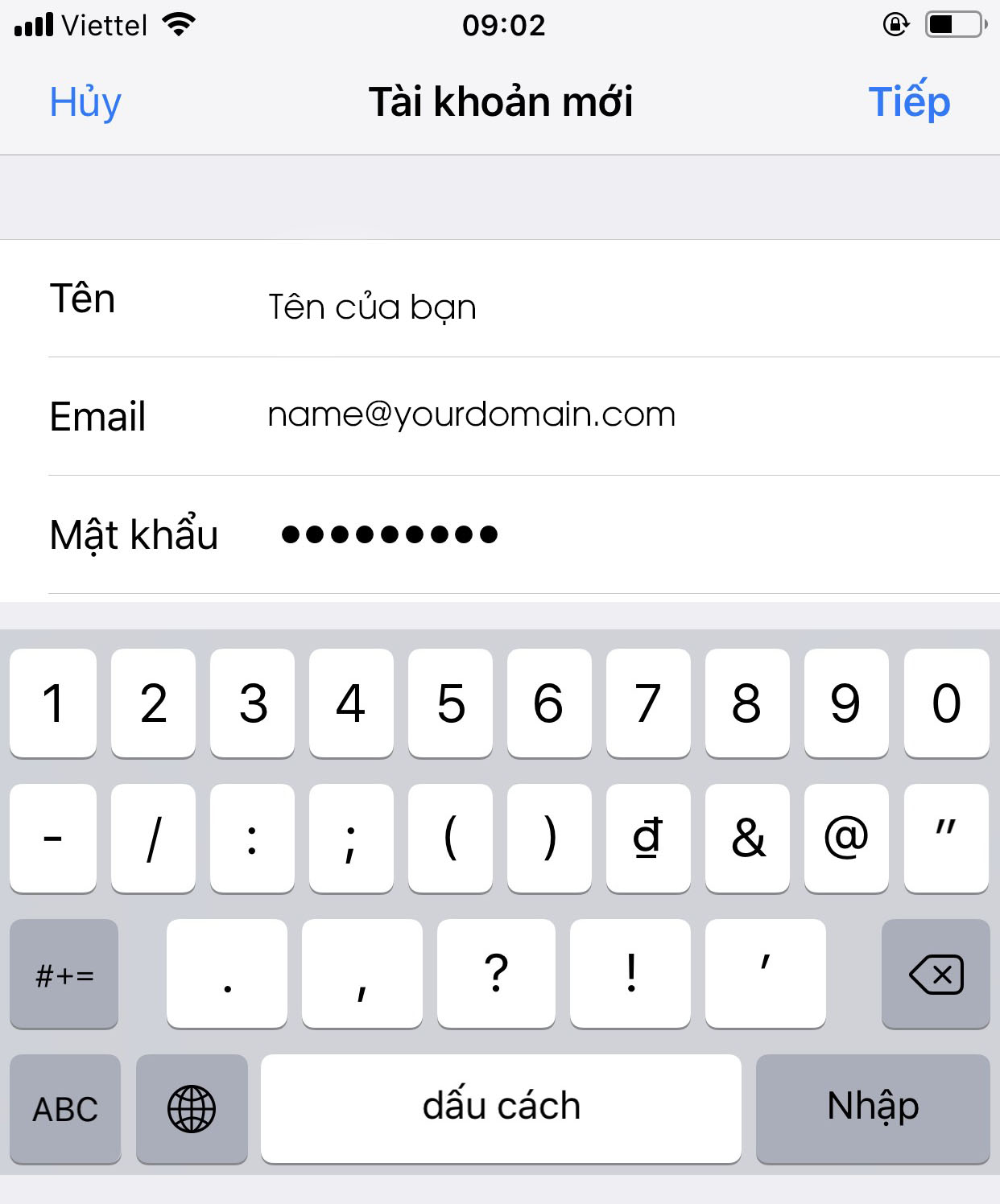
<span style="font-size:16px;">Tạo mới Email, Nhập thông tin tài khoản Email tương ứng vào các ô:<br  />
&nbsp;</span>

<div style="text-align:center"><img alt="p1" height="1496" src="https://buctuongso.com/uploads/news/2021_04/mail-ios/p1.jpg" width="1242" /></div>
<br  />
<span style="font-size:16px;">Chọn Tiếp để vào hộp thoại cấu hình cho tài khoản Email:</span>

<div style="text-align:center"><img alt="p2" height="1600" src="https://buctuongso.com/uploads/news/2021_04/mail-ios/p2.jpg" width="900" /></div>
&nbsp;

<p><span style="font-size:16px;">Chúng ta có thể chọn IMAP hoặc POP để cấu hình cho tài khoản, ở đây chọn IMAP, nhập các thông tin tương ứng theo yêu cầu, chú ý “cả hai ô máy chủ thư đến và máy chủ thư đi ” chúng ta nhập là <strong>sv3.tmail.vn</strong> khi đó email mới cấu hình đúng.</span></p>

<p><span style="font-size:16px;">Sau khi nhập xong nhấn Tiếp để Email server xác minh cấu hình:</span></p>

<div style="text-align:center"><img alt="p3" height="656" src="https://buctuongso.com/uploads/news/2021_04/mail-ios/p3.jpg" width="1242" /></div>

<p><br  />
<span style="font-size:16px;">Vậy là chúng ta đã hoàn tất việc cấu hình sử dụng Email trên điện thoại Iphone một cách dễ dàng và nhanh chóng.</span></p>

<p><span style="font-size:16px;">Nếu trong quá trình cài đặt có gặp vấn đề lỗi hay thắc mắc nào vui lòng liên hệ gửi Email về mail&nbsp;<b><i>admin@buctuongso.com</i></b></span></p>
		</div>
	</div>
	<div id="footer" class="clearfix">
		<div id="url">
			<strong>URL của bản tin này: </strong><a href="https://buctuongso.com/kien-thuc-chung/huong-dan-cau-hinh-email-server-tren-smartphone-ios-23.html" title="Hướng dẫn cấu hình Email Server trên SMARTPHONE IOS">https://buctuongso.com/kien-thuc-chung/huong-dan-cau-hinh-email-server-tren-smartphone-ios-23.html</a>

		</div>
		<div class="clear"></div>
		<div class="copyright">
			&copy; Đăng ký tên miền, hosting uy tín tại Việt Nam
		</div>
		<div id="contact">
			<a href="mailto:webmaster@localhost">webmaster@localhost</a>
		</div>
	</div>
</div>
        <div id="timeoutsess" class="chromeframe">
            Bạn đã không sử dụng Site, <a onclick="timeoutsesscancel();" href="https://buctuongso.com/#">Bấm vào đây để duy trì trạng thái đăng nhập</a>. Thời gian chờ: <span id="secField"> 60 </span> giây
        </div>
        <div id="openidResult" class="nv-alert" style="display:none"></div>
        <div id="openidBt" data-result="" data-redirect=""></div>
<div id="run_cronjobs" style="visibility:hidden;display:none;"><img alt="" src="/index.php?second=cronjobs&amp;p=o9j3rne1" width="1" height="1" /></div>
<script src="https://buctuongso.com/assets/js/jquery/jquery.min.js"></script>
<script>var nv_base_siteurl="/",nv_lang_data="vi",nv_lang_interface="vi",nv_name_variable="nv",nv_fc_variable="op",nv_lang_variable="language",nv_module_name="news",nv_func_name="savefile",nv_is_user=0, nv_my_ofs=-4,nv_my_abbr="EDT",nv_cookie_prefix="btc68",nv_check_pass_mstime=1738000,nv_area_admin=0,nv_safemode=0,theme_responsive=1,nv_is_recaptcha=0;</script>
<script src="https://buctuongso.com/assets/js/language/vi.js"></script>
<script src="https://buctuongso.com/assets/js/global.js"></script>
<script src="https://buctuongso.com/themes/default/js/news.js"></script>
<script src="https://buctuongso.com/themes/default/js/main.js"></script>
<script type="application/ld+json">
        {
            "@context": "https://schema.org",
            "@type": "Organization",
            "url": "https://buctuongso.com",
            "logo": "https://buctuongso.com/uploads/stc-logo.png"
        }
        </script>
<script src="https://buctuongso.com/themes/default/js/bootstrap.min.js"></script>
</body>
</html>