<!DOCTYPE html>
    <html lang="vi" xmlns="http://www.w3.org/1999/xhtml" prefix="og: http://ogp.me/ns#">
    <head>
<title>Hướng dẫn sử dụng OUTLOOK backup &#40;sao lưu&#41; Email</title>
<meta name="description" content="Hướng dẫn sử dụng OUTLOOK backup &#40;sao lưu&#41; Email - Savefile - Tin Tức -...">
<meta name="author" content="Đăng ký tên miền, hosting uy tín tại Việt Nam">
<meta name="copyright" content="Đăng ký tên miền, hosting uy tín tại Việt Nam">
<meta name="generator" content="Tên miền, Web Hosting, Email, VPS &amp; Dịch vụ lưu trữ Website Việt Nam">
<meta name="viewport" content="width=device-width, initial-scale=1">
<meta http-equiv="Content-Type" content="text/html; charset=utf-8">
<meta property="og:title" content="Hướng dẫn sử dụng OUTLOOK backup &#40;sao lưu&#41; Email">
<meta property="og:type" content="website">
<meta property="og:description" content="Savefile - Tin Tức - https&#x3A;&#x002F;&#x002F;buctuongso.com&#x002F;savefile&#x002F;kien-thuc-ve-email-server&#x002F;huong-dan-su-dung-outlook-backup-sao-luu-email-25.html">
<meta property="og:site_name" content="Đăng ký tên miền, hosting uy tín tại Việt Nam">
<meta property="og:url" content="https://buctuongso.com/kien-thuc-ve-email-server/huong-dan-su-dung-outlook-backup-sao-luu-email-25.html">
<link rel="shortcut icon" href="https://buctuongso.com/uploads/global.jpg">
<link rel="canonical" href="https://buctuongso.com/kien-thuc-ve-email-server/huong-dan-su-dung-outlook-backup-sao-luu-email-25.html">
<link rel="alternate" href="https://buctuongso.com/rss/" title="Tin Tức" type="application/rss+xml">
<link rel="alternate" href="https://buctuongso.com/rss/kien-thuc-chung/" title="Tin Tức - Kiến thức chung" type="application/rss+xml">
<link rel="alternate" href="https://buctuongso.com/rss/kien-thuc-ve-email-server/" title="Tin Tức - Kiến thức về Email Server" type="application/rss+xml">
<link rel="alternate" href="https://buctuongso.com/rss/kien-thuc-ve-ten-mien/" title="Tin Tức - Kiến thức về Tên miền" type="application/rss+xml">
<link rel="alternate" href="https://buctuongso.com/rss/kien-thuc-ve-cloud-hosting/" title="Tin Tức - Kiến thức về Cloud Hosting" type="application/rss+xml">
<link rel="alternate" href="https://buctuongso.com/rss/kien-thuc-ve-chung-chi-ssl/" title="Tin Tức - Kiến thức về Chứng chỉ SSL" type="application/rss+xml">
<link rel="alternate" href="https://buctuongso.com/rss/Tuyen-dung/" title="Tin Tức - Tuyển dụng" type="application/rss+xml">
<link rel="preload" as="script" href="https://buctuongso.com/assets/js/jquery/jquery.min.js">
<link rel="preload" as="script" href="https://buctuongso.com/assets/js/language/vi.js">
<link rel="preload" as="script" href="https://buctuongso.com/assets/js/global.js">
<link rel="preload" as="script" href="https://buctuongso.com/themes/default/js/news.js">
<link rel="preload" as="script" href="https://buctuongso.com/themes/default/js/main.js">
<link rel="preload" as="script" href="https://buctuongso.com/themes/default/js/bootstrap.min.js">
<link rel="stylesheet" href="https://fonts.googleapis.com/css?family=Roboto+Condensed:400,700%7CRoboto:300,400,500,700,900%7COpen+Sans:300,400,600,700,800&subset=vietnamese" />
<link rel="StyleSheet" href="https://buctuongso.com/assets/css/font-awesome.min.css">
<link rel="StyleSheet" href="https://buctuongso.com/themes/default/css/bootstrap.min.css">
<link rel="StyleSheet" href="https://buctuongso.com/themes/default/css/style.css">
<link rel="StyleSheet" href="https://buctuongso.com/themes/default/css/style.responsive.css">
<link rel="StyleSheet" href="https://buctuongso.com/themes/default/css/news.css">
<style>
	body{background: #fff;}
</style>
    </head>
    <body>
<div id="print">
	<div id="hd_print">
		<h2 class="pull-left">Đăng ký tên miền, hosting uy tín tại Việt Nam</h2>
		<p class="pull-right"><a title="Đăng ký tên miền, hosting uy tín tại Việt Nam" href="https://buctuongso.com/">https://buctuongso.com</a></p>
	</div>
	<div class="clear"></div>
	<hr />
	<div id="content">
		<h1>Hướng dẫn sử dụng OUTLOOK backup &#40;sao lưu&#41; Email</h1>
		<ul class="list-inline">
			<li>Thứ sáu - 22/07/2022 00:19</li>
			<li class="hidden-print txtrequired"><em class="fa fa-print">&nbsp;</em><a title="In ra" href="javascript:;" onclick="window.print()">In ra</a></li>
			<li class="hidden-print txtrequired"><em class="fa fa-power-off">&nbsp;</em><a title="Đóng cửa sổ này" href="javascript:;" onclick="window.close()">Đóng cửa sổ này</a></li>
		</ul>
		<div class="clear"></div>
		<div id="hometext">
			Để sử dụng sao lưu Email server trên Outlook chúng ta thực hiện các bước sau:
		</div>
		<div id="bodytext" class="clearfix">
			<strong><span style="font-size:18px;"><span style="background-color:rgb(255, 255, 0);">1.</span>&nbsp;Chuyển chế độ duyệt mail từ&nbsp;<span style="color:rgb(231, 76, 60);">POP </span>to <span style="color:rgb(231, 76, 60);">IMAP</span></span>. Nếu đang dùng IMAP duyệt mail có thể bỏ qua bước này.</strong><br  />
<br  />
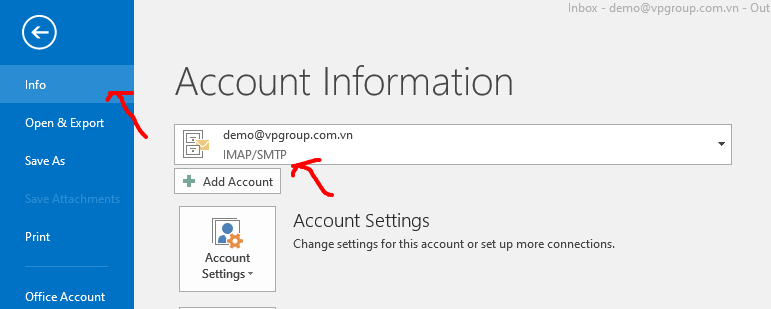
Cách kiểm tra đang dùng <strong>POP </strong>hay <strong>IMAP </strong>trên OUTLOOK. Click vào <strong>File </strong>-&gt; chọn<strong>&nbsp;Info. </strong>Bạn sẽ nhìn thấy trong phần Account Information nếu địa chỉ mail của bạn đang thể hiện IMAP/SMTP thì là bạn đã sử dụng duyệt mail qua <strong>IMAP </strong>rồi,<br  />
&nbsp;
<div style="text-align:center"><img alt="00" height="309" src="https://buctuongso.com/uploads/news/2022_07/00.png" width="771" /></div>
<br  />
<br  />
Nếu cấu hình là <strong>POP/SMTP</strong> thì bạn xoá địa chỉ mail cũ đi &amp; cấu hình lại email cho về <strong>IMAP</strong> như sau :<br  />
<br  />
<span style="font-size:18px;"><strong>Cấu hình địa chỉ mail duyệt bằng IMAP:</strong></span><br  />
<br  />
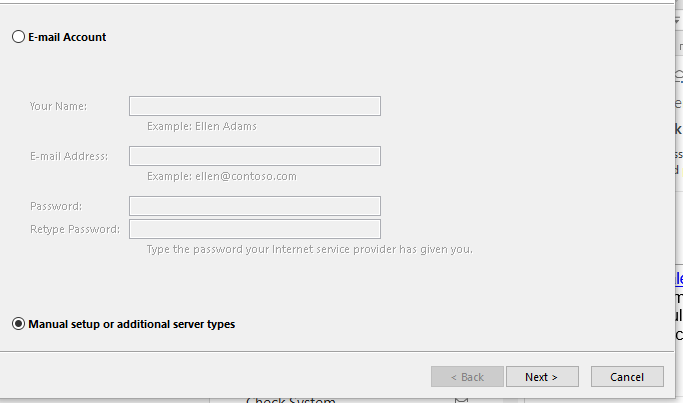
<strong>B1</strong>: Chọn <strong>File </strong>-&gt; <strong>Add Account</strong>. Tích chọn <strong>Manual setup or additional server types</strong>, sau đó nhấn <strong>Next</strong><br  />
&nbsp;
<div style="text-align:center"><img alt="h1" height="403" src="https://buctuongso.com/uploads/news/2022_07/h1.png" width="683" /></div>
<br  />
<br  />
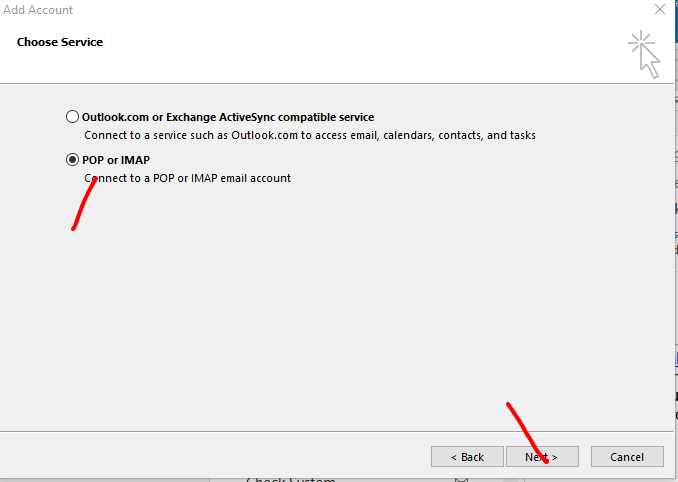
<strong>B2</strong>: Tiếp theo chọn <strong>POP </strong>or <strong>IMAP </strong>và nhấn <strong>Next&nbsp;</strong><br  />
&nbsp;
<div style="text-align:center"><img alt="h2" height="482" src="https://buctuongso.com/uploads/news/2022_07/h2.png" width="678" /></div>
<br  />
<br  />
<strong>B3</strong>: Điền các thông tin cấu hình Email của bạn vào như hình mẫu, sử dụng địa chỉ mail &amp; mật khẩu của bạn. Sau khi điền xong ta nhấn vào nút <strong>More Settings..</strong>.<br  />
&nbsp;
<div style="text-align:center"><img alt="h4" height="480" src="https://buctuongso.com/uploads/news/2022_07/h4.png" width="409" /></div>
<br  />
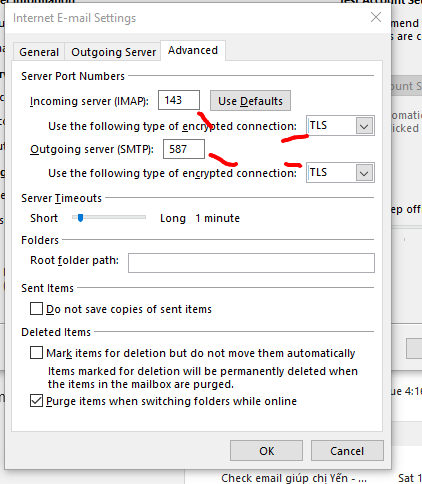
<strong>B4</strong>: Phần Tab <strong>Outgoing Server </strong>chọn như hình, tiếp tục chọn sang Tab <strong>Advance</strong>.

<div style="text-align:center"><img alt="h5" height="484" src="https://buctuongso.com/uploads/news/2022_07/h5.png" width="422" /></div>
<br  />
<strong>B5</strong>: Cài đặt đúng thông số như trên và nhấn <strong>OK</strong>. Sau đó ta tiếp tục nhấn <strong>Next </strong>để kiểm tra xem cấu hình đúng chưa.<br  />
&nbsp;
<div style="text-align:center"><img alt="h6" height="422" src="https://buctuongso.com/uploads/news/2022_07/h6.png" width="684" /></div>
<br  />
<br  />
<strong>B6</strong>: Nếu báo <strong>Complete </strong>ta nhấn <strong>Close </strong>và <strong>Finish</strong>.

<div style="text-align:center"><img alt="19 2" height="249" src="https://buctuongso.com/uploads/news/2022_07/19-2.png" width="487" /></div>
<br  />
<span style="font-size:20px;"><strong>2.</strong> <strong>Tiến hành backup, sao lưu lại toàn bộ mail</strong></span><br  />
<br  />
Trong Tab <strong>Send / Receive</strong> ta nhấn lại nút <strong>Send / Receive All folder</strong> để load tải lại toàn bộ email trên server về.&nbsp;<br  />
&nbsp;
<div style="text-align:center"><img alt="h7" height="195" src="https://buctuongso.com/uploads/news/2022_07/h7.png" width="533" /></div>
<br  />
Sau khi mail hoàn tất tải xong hết ta click vào <strong>File</strong> - chọn <strong>Open &amp; Export </strong>và tiến hành sao lưu<br  />
&nbsp;
<div style="text-align:center"><img alt="h10" height="593" src="https://buctuongso.com/uploads/news/2022_07/h10.png" width="685" /></div>
Chọn phần <strong>Export to file </strong>và nhấn <strong>Next</strong>.

<div style="text-align:center"><img alt="h11" height="363" src="https://buctuongso.com/uploads/news/2022_07/h11.png" width="486" /></div>
<br  />
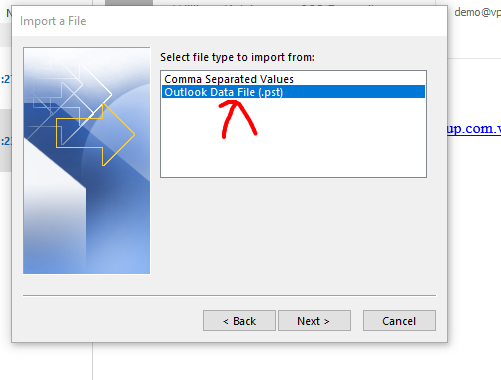
Chọn định dạng file outlook .<strong>pst</strong>.<br  />
&nbsp;
<div style="text-align:center"><img alt="h12" height="380" src="https://buctuongso.com/uploads/news/2022_07/h12.png" width="501" /></div>
&nbsp;Select chọn mail cần sao lưu &amp; tích chọn cả<strong>&nbsp;Include subfolders</strong>.&nbsp;<br  />
&nbsp;
<div style="text-align:center"><img alt="h13" height="368" src="https://buctuongso.com/uploads/news/2022_07/h13.png" width="486" /></div>
<br  />
<br  />
Tự chọn đường dẫn lưu file
<div style="text-align:center"><img alt="h14" height="366" src="https://buctuongso.com/uploads/news/2022_07/h14.png" width="503" /></div>
<br  />
Nhấn OK luôn nếu muốn nhập pass để bảo mật file.<br  />
&nbsp;
<div style="text-align:center"><img alt="h15" height="363" src="https://buctuongso.com/uploads/news/2022_07/h15.png" width="318" /></div>
<br  />
Hoàn thành xong phần sao lưu file.
		</div>
	</div>
	<div id="footer" class="clearfix">
		<div id="url">
			<strong>URL của bản tin này: </strong><a href="https://buctuongso.com/kien-thuc-ve-email-server/huong-dan-su-dung-outlook-backup-sao-luu-email-25.html" title="Hướng dẫn sử dụng OUTLOOK backup &#40;sao lưu&#41; Email">https://buctuongso.com/kien-thuc-ve-email-server/huong-dan-su-dung-outlook-backup-sao-luu-email-25.html</a>

		</div>
		<div class="clear"></div>
		<div class="copyright">
			&copy; Đăng ký tên miền, hosting uy tín tại Việt Nam
		</div>
		<div id="contact">
			<a href="mailto:webmaster@localhost">webmaster@localhost</a>
		</div>
	</div>
</div>
        <div id="timeoutsess" class="chromeframe">
            Bạn đã không sử dụng Site, <a onclick="timeoutsesscancel();" href="https://buctuongso.com/#">Bấm vào đây để duy trì trạng thái đăng nhập</a>. Thời gian chờ: <span id="secField"> 60 </span> giây
        </div>
        <div id="openidResult" class="nv-alert" style="display:none"></div>
        <div id="openidBt" data-result="" data-redirect=""></div>
<script src="https://buctuongso.com/assets/js/jquery/jquery.min.js"></script>
<script>var nv_base_siteurl="/",nv_lang_data="vi",nv_lang_interface="vi",nv_name_variable="nv",nv_fc_variable="op",nv_lang_variable="language",nv_module_name="news",nv_func_name="savefile",nv_is_user=0, nv_my_ofs=-4,nv_my_abbr="EDT",nv_cookie_prefix="btc68",nv_check_pass_mstime=1738000,nv_area_admin=0,nv_safemode=0,theme_responsive=1,nv_is_recaptcha=0;</script>
<script src="https://buctuongso.com/assets/js/language/vi.js"></script>
<script src="https://buctuongso.com/assets/js/global.js"></script>
<script src="https://buctuongso.com/themes/default/js/news.js"></script>
<script src="https://buctuongso.com/themes/default/js/main.js"></script>
<script type="application/ld+json">
        {
            "@context": "https://schema.org",
            "@type": "Organization",
            "url": "https://buctuongso.com",
            "logo": "https://buctuongso.com/uploads/stc-logo.png"
        }
        </script>
<script src="https://buctuongso.com/themes/default/js/bootstrap.min.js"></script>
</body>
</html>